To connect your strategy to the exchange account you need to give us specific permissions by creating the API keys. Please note that the API keys restrictions do not allow us to withdraw or move funds from your account. Here are some tips on creating the API keys on Binance.
For BETA strategies check Enable Spot & Margin only. Save settings
How to create a new pair of API keys on Binance
Log in to your Binance account. Choose a wallet (Spot – for BETA strategies, Futures – for ALPHA strategies)
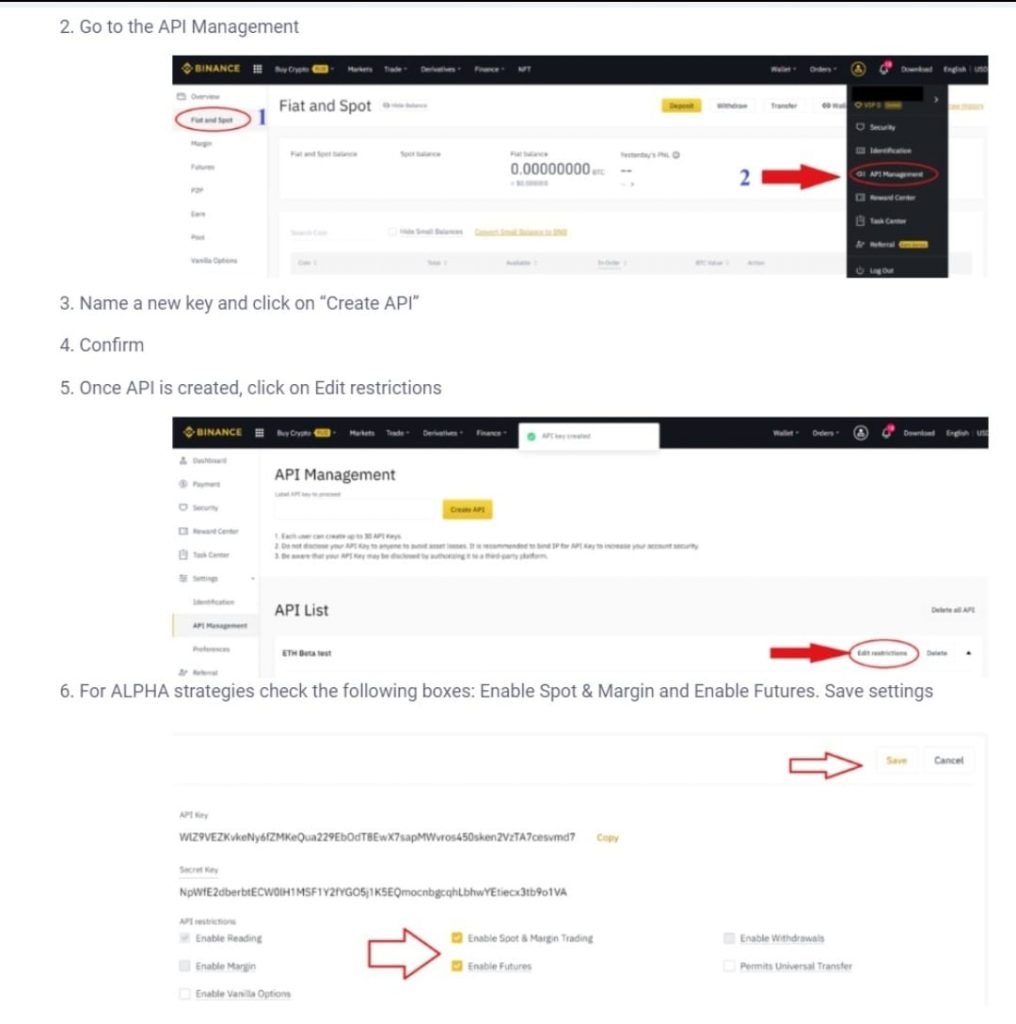
Go to the API Management
Name a new key and click on “Create API”
Confirm
Once API is created, click on Edit restrictions
For ALРHA strategies check the following boxes: Enable Spot & Margin and Enable Futures. Save settings
For BETA strategies check Enable Spot & Margin only. Save settings
How to create a new pair of API keys on Binance.US
Ensure that you have opened an account at BINANCE.US
Deposit into the account using credit card, bank wire, or crypto deposit. Then convert your funds to USDT or BTC depending on a strategy.
Create an API Key and Secret Key. Normal settings are fine, you do not need to change anything.
Notify your Algochain account manager and provide us with the text for both API and SECRET Key. Both are required to connect you.